 This is what I did this new years instead of party.
While somewhat lonely, I think this is the mark of a prosperous year.
This is what I did this new years instead of party.
While somewhat lonely, I think this is the mark of a prosperous year.
Tuesday, December 31, 2013
Real-Time re-rendering plasma-glow
This is what I did this new years instead of party.
While somewhat lonely, I think this is the mark of a prosperous year.

What is it all about?
I've been thinking about what Matthew Griebner
said a while ago about, "What is our game about?"

There are some things I've realized
I've known it was about, but never
really explicitly said.

Beyond Exploding bombs.
The game is about PREDICTABLE chain reactions.


I was taking a look at the game "escape goat"
which I just purchased off of steam.
I was told it was a lot like our project.

Except one big difference that sets us apart
is that it is possible to visualize what will
happen before it happens. If I do add any other
features related to mechanics, they will fall
within this rule.

What else?

Right now I am still working on lighting.
Tyler Woods and some others brought up that the
light fixtures do not look like light fixtures.
They do now. After a week of coding up in a cabin
with no internet access, I finally fixed a lighting
module that I am using for "White Hot" glowing effects.

Because of the optimizations I've painstakenly made,
this extra "ooh shiny shiny" will not slow down the game.

Note: In case my spaztic mind forgets:
Bound Function:
var isGoodTimeToReRender:Function. Returns Boolean.
Also, flag, "isInNeedOfReRender:Boolean" checked before calling
function. As function calls are slower than checking Booleans.

I am still not yet happy with the lighting.
I want it dramatic and very noticable,
yet at the same time, I do not want it to interfere
(unintentionally) with people figuring out the
layout of the current level.

Last note, I need to visit Tyler as he showed up for a meeting
that I organized, that I ended up showing to late.
I am sorry about that. I'll take the time to make that up to you.
Tuesday, December 17, 2013
Using Deviant Art as a marketing tool
I have decided to put up an animated GIF of every single level of my game before it is released.
How popular a given animated GIF becomes on deviant-art will let me know how much visual impact a designed level has.
The GIFs with the most views will make it into the game.

Also:
All levels will be given a "level name" / "room name"
We will name our submission on deviant-art with that "level name".

Not only will deviant-art submissions help improve the visual impact of the game, it will also help build hype for the game.
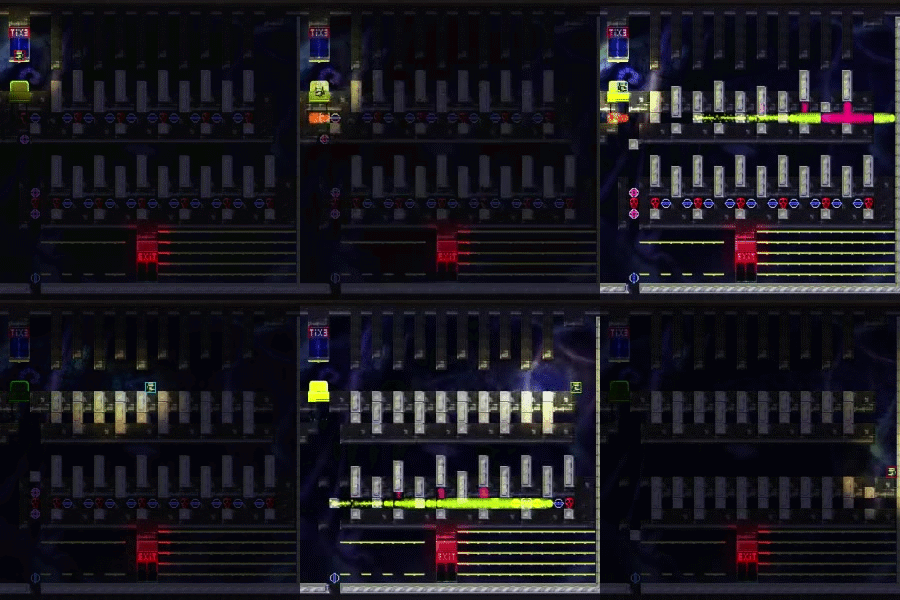
Friday, December 13, 2013
Directional Bomb Animation Indicators
Today: I did everything on my checklist:
1. Hard Reset (Keep original full file path along with the level in order to hard reset)
   This makes it so my level designer can edit levels while being played.
2. Watermark. More classy for "let's play"
   Game is almost ready for a let's play... But I need to fix up all the levels I botched
   since the last time I released the game now.
3. Animated runway light bomb mockup.
   Bombs now have animations that give a clue to their directionality.
4. Some game-design doc literature.
   Working on game design docs for the level editor pipeline.
   This way my level designer wont need to always ask me what does what.
   But, of course, I will offer my assistance if needed.

Also:
1. Fixed a glitch in my invisible tile collision that was causing invisible tiles to be auto-tiled.
2. Looked up lectures on S.C.R.U.M.


Here is a screen shot:

Thoughts:
1. I should have a sample-level on my deviant-art. One sample level showing off some improvement I have made to the game.
2. Ted Talk that basically said there are only lame jobs, or great jobs. There are no good jobs.
   I want to apply this mindset to making a successful video game.
   Either your success is lame, or great. But no gradient in-between.
   This game will not be released until I feel it is polished to an acceptable level.
Sunday, December 8, 2013
Re-writing an old gallery slide-show class
I ran into some glitches with some old code I wrote.
I am going to re-write the class.
But instead of making a version that is "hand-tweened" (which makes it easy to pause in place by simply not calling the update() method)
I am going to build it on top of GreenSock's TweenMax engine.

Here are my notes:
I had a hard time figuring out what I was going to do, so I wrote down different ideas for how to code it till I hit
something that made a lot of sense and wasn't too abstract.

I'd say a good use of my time, as I am too tired to program. Yet not tired enough to sleep.

Though I really should do this more often. Taking the time to think about what you are going to program, instead of programming
right away, can be very valuable. And this is coming from someone who is a "straight ahead" coder.
I usually code as I think.

new conveyer code design:

//Diagram of conveyer with 3 items in it that are all on screen at the same time.
//[p] stands for portal. if animating left-to-right,
// v2 will smoothly animate to [p1], then TELEPORT directly to [p0], then continue to animate to old position
// of [v0];
[p0]-----[v0]-------[v1]---------[v2]------[p1]

//how do you handle tweening it, but stitching it back together gracefully?
//idea1: Programmer "trip itineraries" for each object.
//       Problem: Seems unecessarily abstract and complex.
//idea2: Animate [p1] to [p2] travel, but make the object being animated .visible==false.
         Problem: leaves spot [v0] empty.
//idea3: Helper Object manages it's own "flight" to a destination.
         The main class it belongs to just changes the destination. But the helper is responsible for the details.

//idea4: Each static "check-point" has a "prev" and "next variable.
//       in addition to this, each check-point has a "youCanStayHere" variable.
//       [p0] and [p1], as points OFF the screen, have "youCanStayHere == false".
//
//       in addition to this:
//       if(youCanStayHere==false, but .next == null,
//       then we are on [p1] moving forward. Teleport object at [p1] to [p0];
//
//       CONVERSLY:
//       if(youCanStayHere==false, but .prev == null,
//       then we are on [p0] moving BACKWARDS. Teleport to object at [p0] to [p1];

//OLD NOTES NOT PERTAINING TO idea4:
/** Value from negative INF to positive INF that represents shifting the array of points forward or backwards. **/
var _arrayShiftOffset:int;

/** A vector of the points we are targeting. We want to CENTER display objects on these points. **/
var _staticTargetPointVector:vector.;


var _helperHolderSpriteVector:Vector.;
Saturday, December 7, 2013
UI Work. Refactoring years old code.
http://www.timetoflash.blogspot.com/2012/01/uilinconbelt.html
http://www.timetoflash.blogspot.com/2011/12/conveyer-belt-class-uilinearconveyeras.html

When I first started learning flash, I made these two classes. Which now I can use to make
a menu where the selection items scroll into and out of place.

They will require some refactoring, and some hunting down, as my old code base is disorganized.
I basically scrapped my old code base and only use things from my old code base on a need-to-have basis.

Using anything from my old code-base requires me re-factoring the version in my old code base and
putting the refactored copy in my NEW code base.

By refactor I mean:
1. Give the class a more descriptive name.
2. Place the class in package/location that makes sense.
3. Add comments to code. (Its been over a year later, if you read over your code while refactoring and go "WTF is this for?" Then you need to add a comment and possibly refactor your statements.

Right now, I am working on adding a difficulty select menu to my game.
I've already mapped out the menu layout, now I need to code it.
Tuesday, December 3, 2013
sonic smash
Idea for new power:
When you hold down in air, you can smash through the floor tiles.

Upgrade: Shock waves.
When you smash down on the ground, you emit shock waves that will break blocks in the vicinity.

Maybe the shock wave goes straight down. Maybe the shock wave is circular around your body.

Shock wave would NOT kill the green and blue angle tiles.
The isBashable rules would still apply to the shock wave.

But, you could pound down on a non-bashable blue floor, and your shockwave could break bricks below that blue floor
if the bricks under the blue floor are bashable.

Add crouching fixes to emulatable sprite to make it easier to fall down holes that are 1 tile big.
Level design to make you learn you can do this?

[START]
[Dooor]
[     ]
[     ]
--------------------------- Platforms only. Must crouch. (You know how to crouch by now )

[ ]-[ ]-[ ]-[ ]-[ ]-[ ]-    Alternating platforms and blocks. Making you press crouch instinctively to go through.

[ ] [ ] [ ] [ ] [ ] [ ]     Alternating empty-space and blocks. Maybe you'll try crouching to get through now.

THEN, the level will have some time based thing where if you have not learned to crouch through holes, you will not survive.
Subscribe to:
Posts (Atom)